
Everix Cloud IFR
IFR capital and reporting,
as a hosted service.
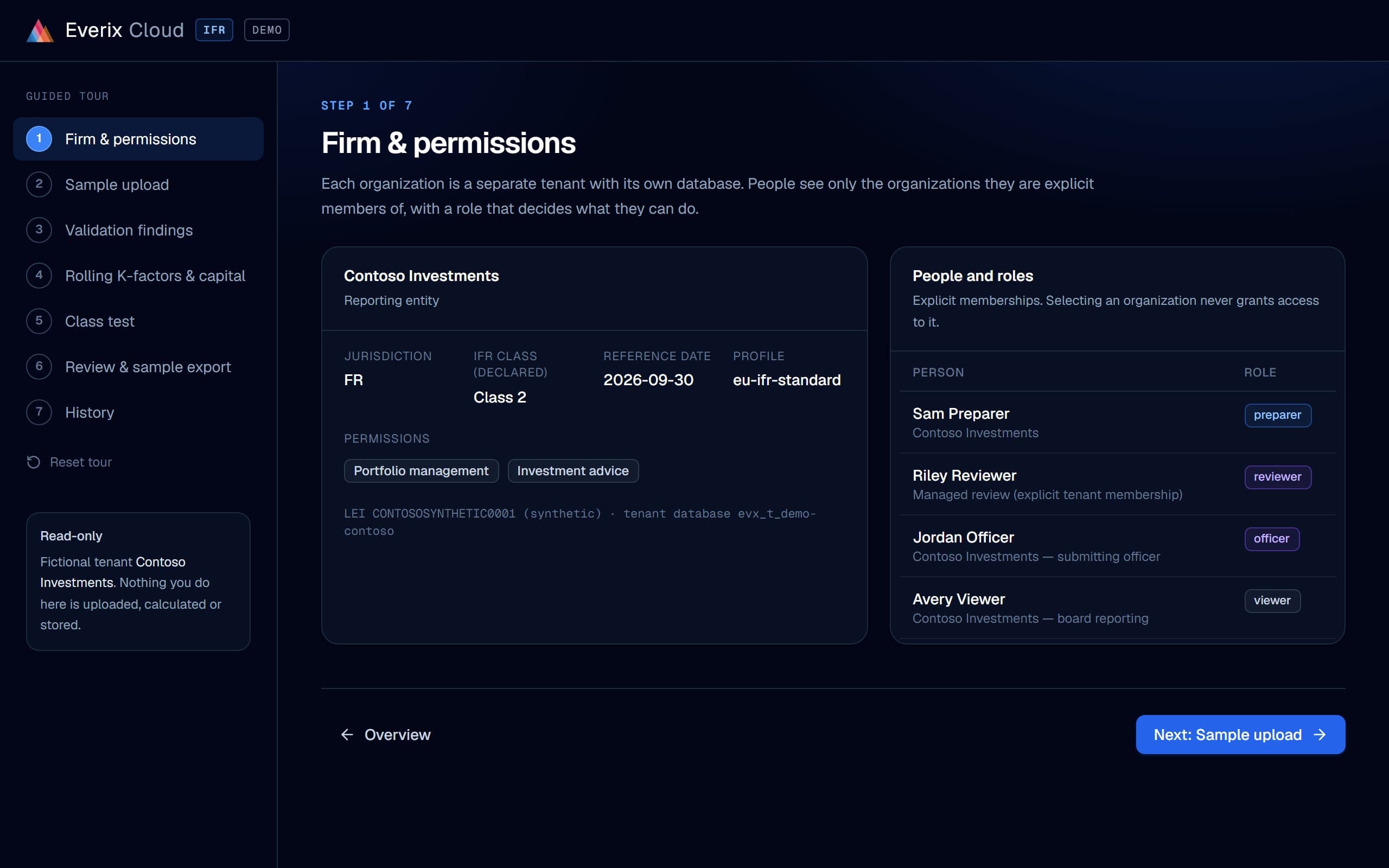
The guided demo needs no account. It uses a fictional firm and synthetic data.
- Own funds requirement
- €292,020
- Headroom
- €307,980
Nothing to install. Everix runs it.
Everix Cloud IFR is the standard hosted IFR service: your team works the period in the browser while Everix runs the infrastructure, the upgrades and the checks.
One portal, run by Everix
Nothing to install or operate. One sign-in and one admin for Everix Cloud IFR and Everix Cloud Risk: Microsoft, Google or an email link. Upgrades are managed by Everix.
EU IFR, end to end
Class 2, Class 3 and groups: K-factors, own funds, the class test, the approval workflow and the EBA pack, period after period.
Same engine as the installed suite
Everix Cloud IFR and the installed product share one C# engine. The same inputs are checked to produce the same results.
Ask your AI assistant
“What are this month’s K-factors?” Your assistant reads capital, K-factors, findings and reports through the read-only MCP server, with a key your admin creates.
A reporting period in the guided demo
A one-minute film of the guided demo, with subtitles: sign-in, firm, upload, validation, capital, class test, review and history. Turn the sound on to hear it.
Upload → calculate → review → ready for submission.
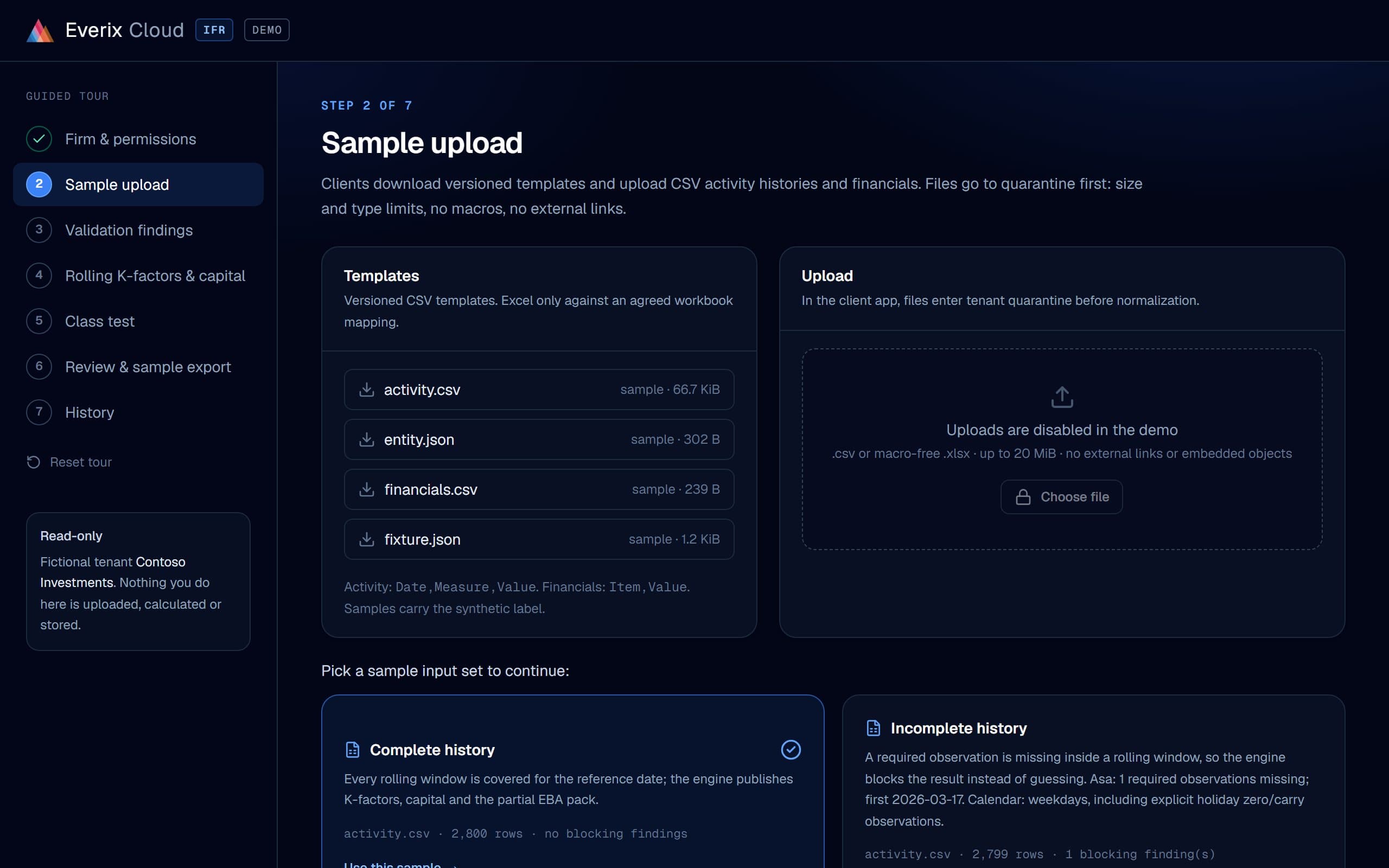
How a reporting period runs. The screens are from the guided demo, with a fictional firm and synthetic data.
- Step 01
Upload
Download versioned CSV templates, fill them from your systems and upload. Files land in quarantine first, then are normalised and checked.
- Activity history and financials as CSV; Excel only against an agreed workbook mapping
- Size and type limits, no macros, no external links or embedded objects
- Dates, units, duplicates and complete rolling windows are checked before any calculation; missing is never treated as zero
app.everix.io/demo/ifr/validation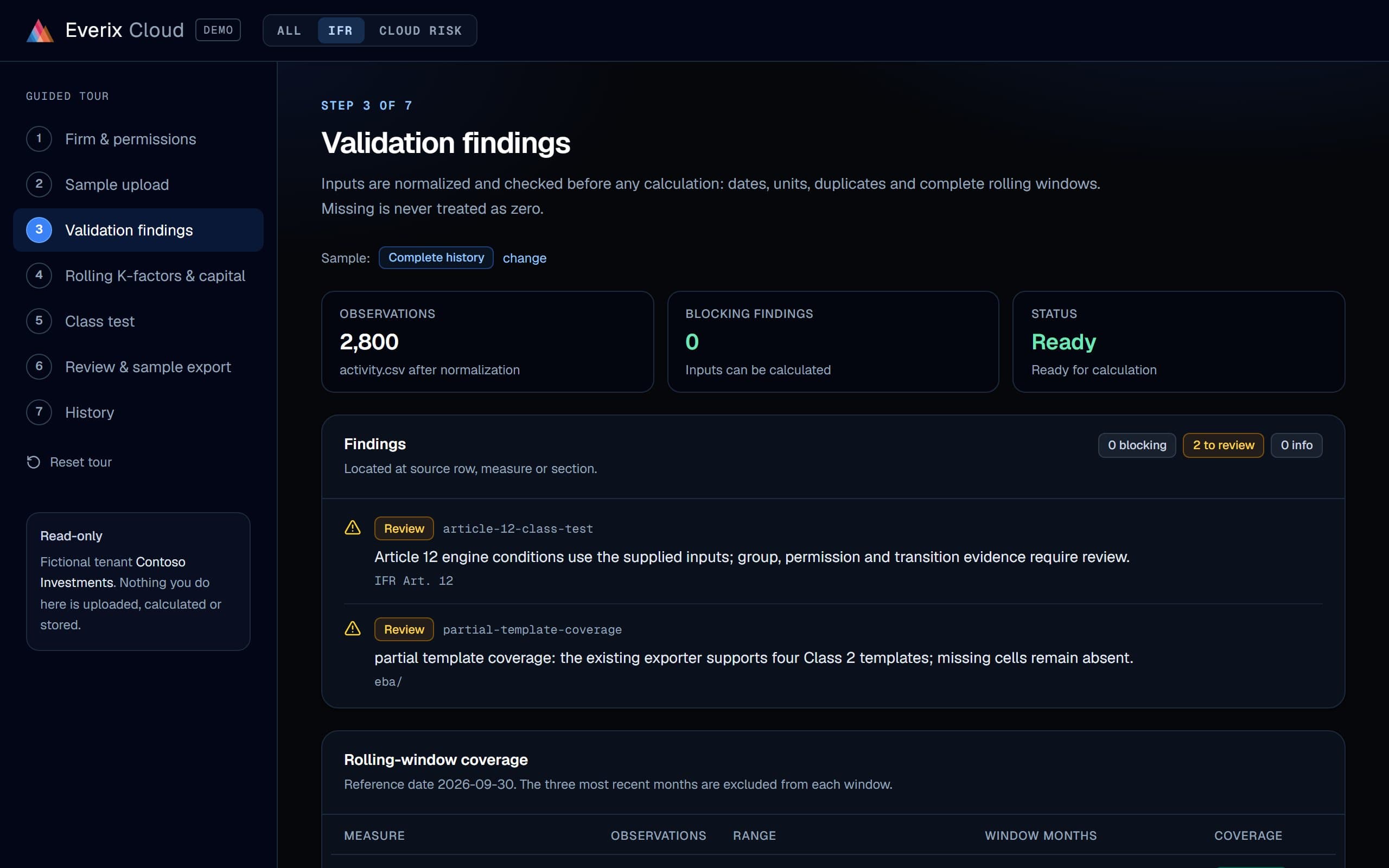
Sample data - Step 02
Calculate in an isolated run
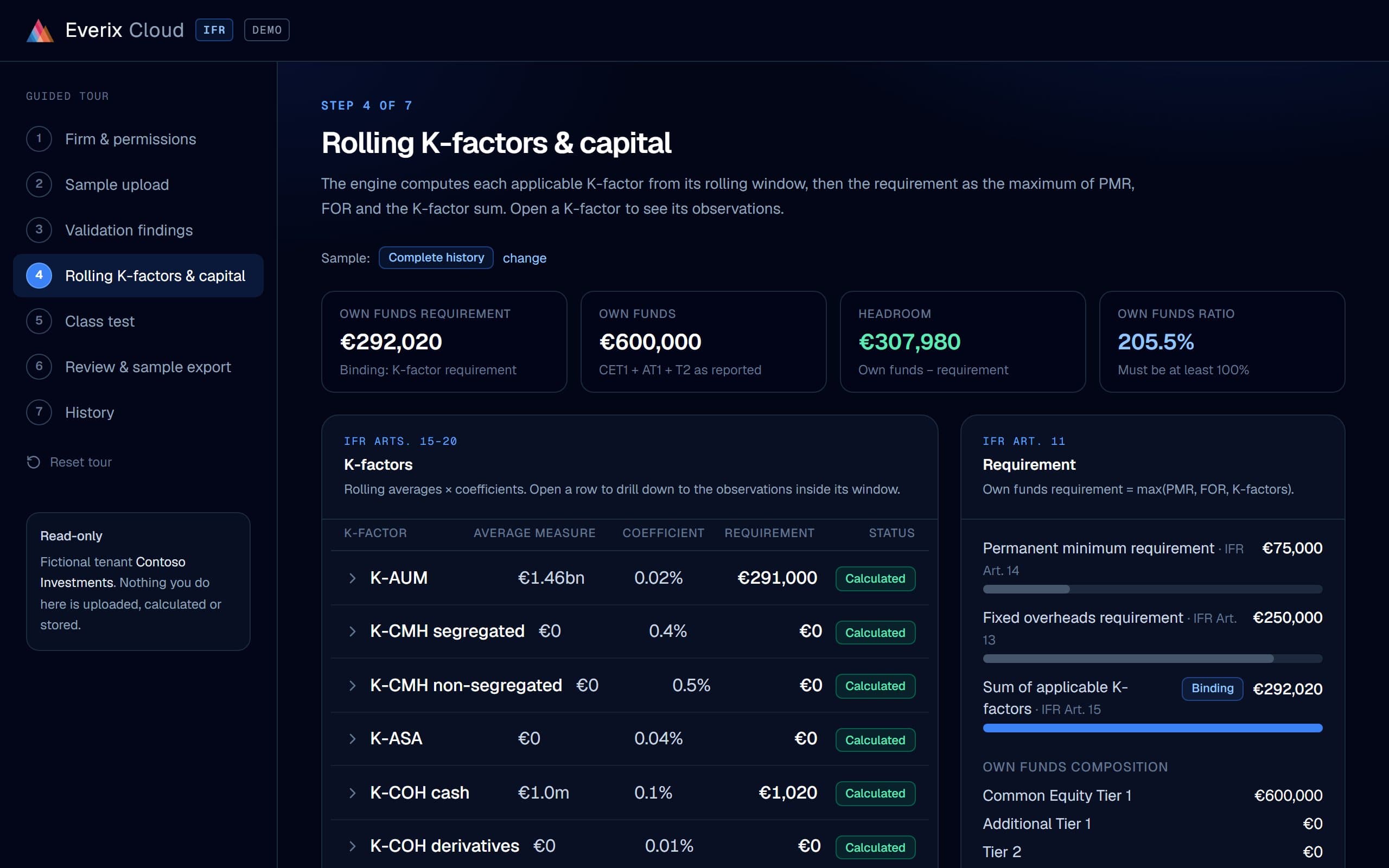
Each calculation is its own job: one run, one firm, one set of inputs. The shared engine computes the K-factors, the own funds requirement and the class test. K-CON, and some market-risk amounts, are figures you attest.
- K-factor rolling windows with the legal reference and the observations behind each average
- max(PMR, fixed overheads requirement, K-factor requirement), own funds and headroom
- An incomplete window blocks the result instead of guessing
app.everix.io/demo/ifr/capitalSample data - Step 03
Review and approve
The preparer submits the run, an independent reviewer checks it and the client officer approves it. Each step is recorded with who, when and why.
- Roles come from explicit memberships: preparer, reviewer, officer, viewer
- Changed inputs create a new run and invalidate earlier approvals
- Drill from any K-factor to its inputs, parameters and run
app.everix.io/demo/ifr/review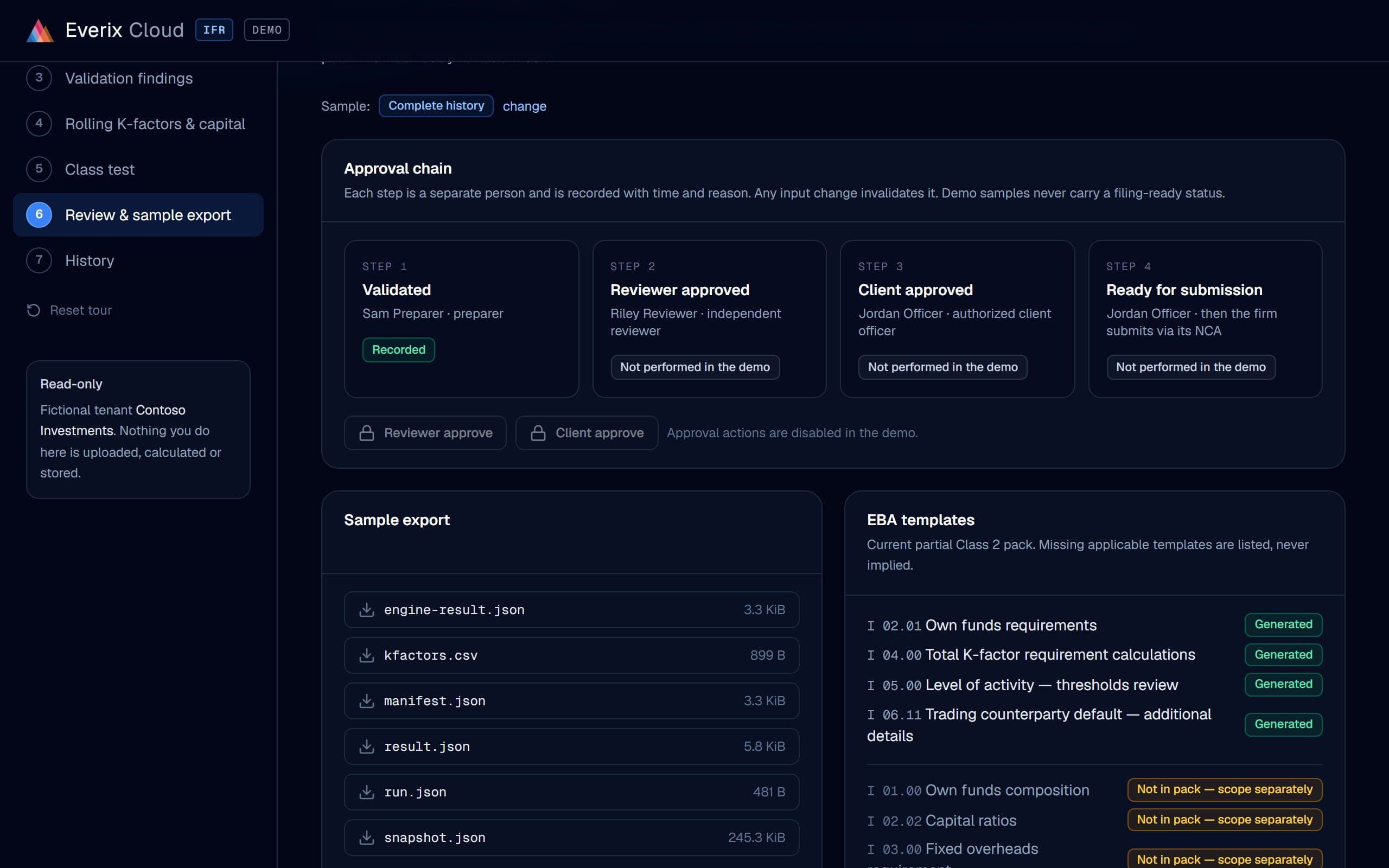
Sample data - Step 04
The pack
An approved run produces the EBA xBRL-CSV pack on framework 4.2, checked and ready for your submission.
- Class 2: the full IF_CLASS2 set. Class 3: I 01.01, I 02.03, I 02.04, I 03.01, I 09.01 and I 05.00. Groups: I 11.01–I 11.03
- ACPR calendar and national checks for French firms
- Your team approves every return before filing
app.everix.io/demo/ifr/history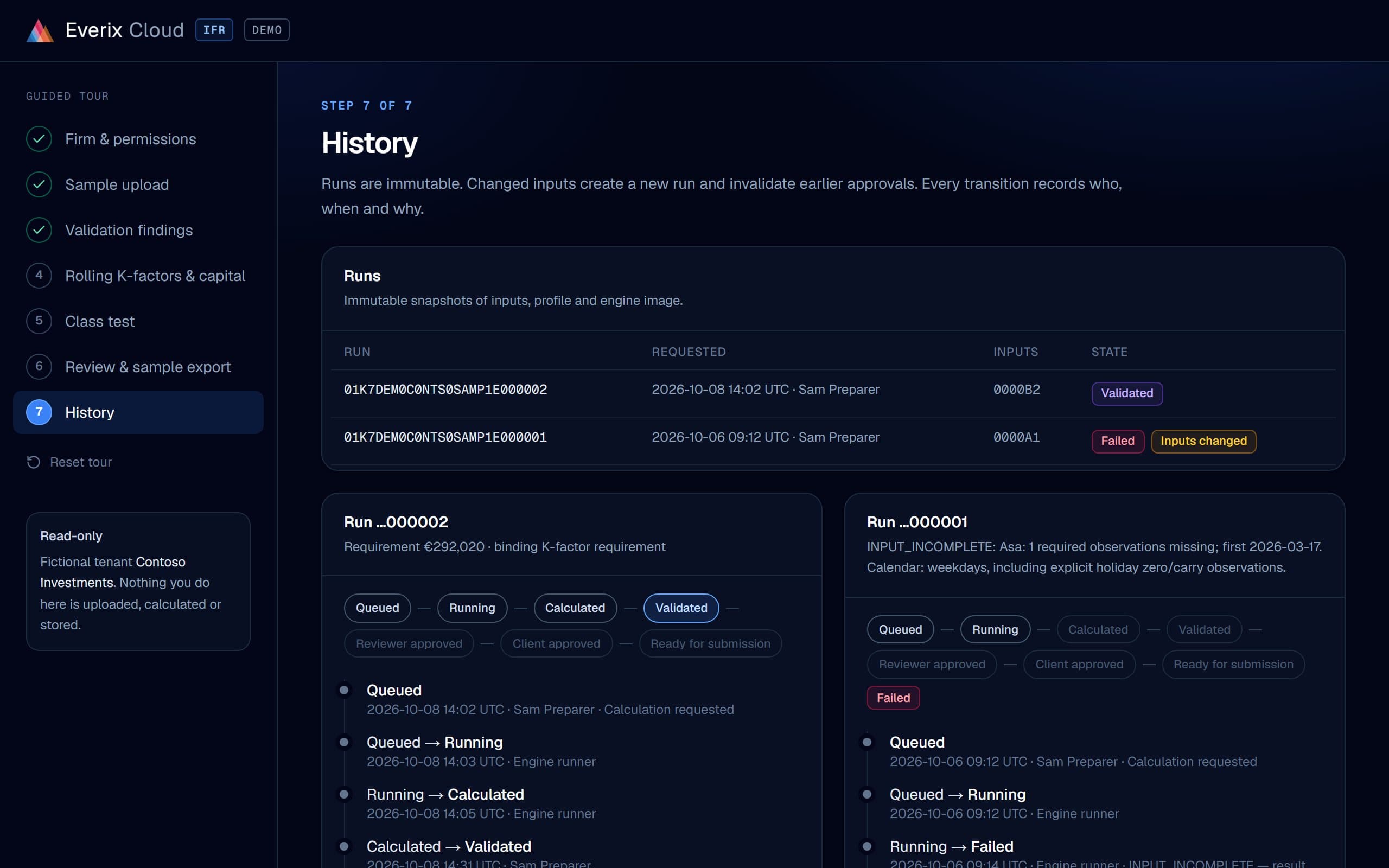
Sample data
Security and tenancy
Your firm's data stays your firm's.
A database per tenant
Each firm is a separate tenant with its own database. People see only the firms they are explicit members of.
EU hosting
Everix Cloud hosts client data in the EU, in Azure France Central. Sub-processors and service levels are published in the service terms. Other regions are available on request.
Isolated runs
Every calculation runs as its own job for one firm and one set of inputs.
Audit trail
Runs are immutable snapshots of inputs, profile and engine image. Every transition records who, when and why.
EU investment firms that report under IFR.
- Class 2 firms that report quarterly, and Class 3 firms that report annually
- Groups that use prudential consolidation or the group capital test
- Firms that would rather not install and run risk software themselves
- Compliance consultancies that prepare IFR returns for client firms
Prefer to run it yourself?
The same engine runs on-premises or in your own cloud.
The installed Everix suite adds XVA, SA-CCR and ISDA SIMM on one trade model. IFR is covered in both.
Onboarding
Your first reporting period, done together.
We start with a scoped onboarding for your first IFR reporting period. Together, we map your structured data, load it and reconcile the calculations with your team. The goal is an agreed pack ready for review, with clear checks and a list of any remaining gaps.
Integration with your systems, such as APIs, file drops, data warehouses or BI tools, is separately scoped work. We agree the inputs, outputs, responsibilities and price before starting. Submission readiness depends on the complete agreed scope and your approval.
- Data templates and CSV mapping for your entity, activities and reporting period, including the required history
- Assisted loading and reconciliation of one reporting period with your finance or compliance team
- K-factor calculations, capital requirements and a clear record of differences and missing data
- Your team reviews and approves the complete return before it is called ready for submission; your firm or authorised preparer submits it
One portal, two modules.
Everix Cloud IFR and Everix Cloud Risk share one sign-in and one admin. Each has its own guided demo with a fictional firm and synthetic data.
Investment firms
Everix Cloud IFR
A reporting period from upload to capital, review and the EBA xBRL-CSV pack.
Commodity & FX funds
Everix Cloud Risk
A fund's book from upload to Monte Carlo and historical VaR, with drill-down to the trade.
Try the Cloud Risk guided demoFrequently asked questions
What is Everix Cloud IFR?+
Everix Cloud IFR is hosted IFR/IFD capital and EBA reporting, run by Everix on the same C# engine as the installed product. A period runs from upload through calculation to review, approval and the pack. It sits in the Everix Cloud portal next to Everix Cloud Risk, under one sign-in.
Is it the same engine as the installed Everix suite?+
Yes. One C# engine runs in Everix Cloud IFR and in the installed product, down to the xBRL-CSV pack.
Where is our data stored?+
Everix Cloud hosts client data in the EU, in Azure France Central. Sub-processors and service levels are published in the service terms. Other regions are available on request.
Does Everix file our IFR return?+
No. Everix prepares and checks the pack; your team approves it and files it. Acceptance is a matter between your firm and its competent authority.
Which reporting templates are included?+
Every active EBA IFR template on framework 4.2, listed in step 04 above. Groups use prudential consolidation or the group capital test. A missing input stays blank; it is never filled with zero.
Can our AI assistant read our IFR figures?+
Yes. Everix Cloud IFR has a read-only MCP server. An admin of your firm creates an agent key under Organization › AI agents; your assistant can then read the latest calculation, K-factors, findings, reports and run history. It cannot upload, calculate or approve, and every call is recorded.
What does the guided demo show?+
A read-only tour of a fictional firm with synthetic data: firm and permissions, upload, validation findings, K-factors and capital, the class test, review and export, and run history. It needs no account.
How do we get started?+
Sign in and open your firm, or book a call first. For your first period we help map your data and reconcile the calculations with your team.
Can we run Everix ourselves instead?+
Yes. Everix Private Cloud offers the full platform in your cloud account or hosted by Everix, and Everix On-site installs it on Windows Server in your data centre. The comparison of deployment options shows what each one covers.
Set up your firm on Everix Cloud IFR
Tell us about your firm. We send your sign-in and a sandbox to try your own data.
Prefer to walk through your last IFR period first? Book a 30-min call